This RPA tools comparison is for teams choosing between Microsoft Power Automate, UiPath and Automation Anywhere in 2026. The short answer: all three can automate desktop, web and back-office work, so the deciding factors are your existing stack, how many unattended bots you need, where the platform must run, and how you will govern it. Power Automate usually fits Microsoft 365 organisations best, UiPath suits teams that want a broad platform with cloud or self-hosted options, and Automation Anywhere suits teams that want a web-based, cloud-native builder.
In this guide
- How the three RPA platforms are built
- Side-by-side comparison table
- Licensing models compared
- Deployment and hosting options
- Governance and security
- How to choose: a four-question framework
- Frequently asked questions
- Conclusion
How the three RPA platforms are built
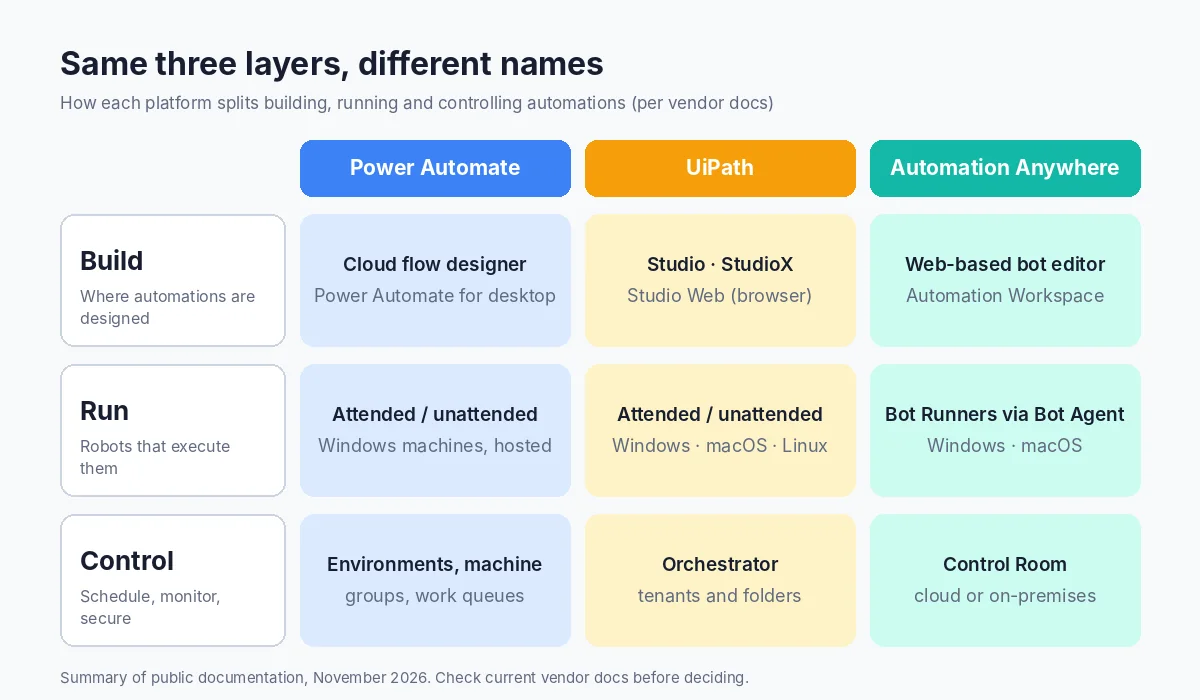
Every RPA platform has the same three jobs: a place to build automations, robots that run them, and a control layer that schedules, monitors and secures those robots. The names differ, and so do the surrounding products.
Microsoft Power Automate
Power Automate has two halves. Cloud flows connect services through API connectors and start automatically (on an event), instantly (from a button) or on a schedule. Desktop flows, built in Power Automate for desktop, add RPA for legacy and desktop applications, websites, Excel and files, using UI elements, images or coordinates. Microsoft’s product page describes more than 1,000 connectors.
Desktop flows are stored in Dataverse, so each environment that builds them needs a Dataverse database. Machines register directly with the cloud when you sign in to Power Automate for desktop, and Microsoft notes that gateways for desktop flows are no longer supported. The desktop app runs on Windows 10, Windows 11 and Windows Server, not on ARM devices. If you want a deeper look at the two halves, read our guide to Power Automate desktop vs cloud flows.
Around the core, Microsoft adds process mining, hosted machines on Windows 365, and Copilot features for building flows in natural language.
UiPath
UiPath is a family of products rather than one tool:
- Studio for professional developers, StudioX for business users automating their own desktop, and Studio Web, a browser-based designer for cross-platform automations.
- Robots, attended (started by a person, often from Assistant) or unattended (started by Orchestrator).
- Orchestrator to deploy, schedule and monitor robots, organised into tenants and folders.
- Surrounding services such as Action Center for human input in long-running workflows, Integration Service for API connectors, Document Understanding and IXP for document extraction, Test Cloud (formerly Test Suite), and agent capabilities with Maestro for orchestrating processes that mix agents, robots and people.
UiPath documents robots for Windows, macOS and Linux (Linux robots run as a Docker container connected to Orchestrator). Our article on attended vs unattended robots in UiPath explains the robot types in detail.
Automation Anywhere
Automation Anywhere’s documentation still uses the name Automation 360, while its website now positions the product as an “Agentic Process Automation System”. The architecture is:
- Control Room, a web-based server that manages development and execution.
- Bot Creators who build automations, and Bot Runners (attended or unattended) that execute them on devices connected through the Bot Agent. The Bot Agent is documented for Windows and macOS.
- Automation Workspace, a web-based, cloud-native builder with natural-language building and Process Composer.
- Related products such as Document Automation, AI Agent Studio (model connections, AI skills and agents), Process Discovery, Automation Co-Pilot for business users, and the Agentic App Store (formerly Bot Store).
For a hands-on example of the document side, see our Automation Anywhere Document Automation guide.
Side-by-side comparison table
The table summarises each vendor’s documentation today. Treat it as a starting point and check every row against your own processes.
| Area | Power Automate | UiPath | Automation Anywhere |
|---|---|---|---|
| Build tools | Cloud flow designer; Power Automate for desktop (Windows) | Studio, StudioX, Studio Web (browser) | Web-based bot editor and Automation Workspace |
| Control layer | Power Automate portal, environments, machine groups | Orchestrator (tenants, folders) | Control Room |
| Robot OS | Windows 10/11, Windows Server | Windows, macOS, Linux (container) | Windows and macOS Bot Agent |
| Hosting | Microsoft cloud; optional hosted machines on Windows 365 | Automation Cloud (SaaS), Public Sector, Dedicated, Automation Suite (self-managed), standalone | Cloud Control Room or On-Premises Control Room |
| API integration | 1,000+ connectors; on-premises data gateway for local data | Integration Service connectors and Connector Builder | Packages and prebuilt actions; Agentic App Store |
| Work queues | Work queues for desktop flows | Orchestrator queues | Workload management queues and device pools |
| Human-in-the-loop | Approvals, Teams, Outlook | Action Center | Automation Co-Pilot |
| Documents and AI | AI Builder and Copilot features (billed via Copilot Credits) | Document Understanding, IXP, agents | Document Automation, AI Agent Studio |
| Process discovery | Process mining | Process Mining | Process Discovery |
Two patterns stand out. First, Power Automate is the only one of the three whose desktop robot is Windows-only, which rarely matters for business apps but can matter for Mac-heavy teams. Second, UiPath and Automation Anywhere both offer a self-hosted control layer, while Power Automate orchestration always runs in Microsoft’s cloud.
Licensing models compared
Licensing is where the three platforms differ most, and where most selection mistakes happen. We do not quote prices here because they change and depend on your agreement; use the vendor pages and a quote for your volumes.
Power Automate licensing
Microsoft’s licensing documentation lists user licences (Premium, plus trial and free options) and capacity licences (Process and Hosted Process):
- Premium is per user and includes attended RPA for that user.
- Process is per bot and is required for unattended desktop automation. It replaced the older per-flow plan and the unattended RPA add-on.
- Hosted Process is per hosted bot running on Microsoft-managed Windows 365 machines.
One change to watch in 2026: Microsoft has moved AI Builder features onto Copilot Credits. Add-on AI Builder capacity packs stopped being sold on 1 November 2025 and reach end of life on 1 November 2026. If your flows use document processing or prompts, budget for Copilot Credits. Microsoft’s Power Automate licence types page is the reference.
UiPath licensing
UiPath currently documents two commercial plans:
- Unified Pricing, built around a single consumable, the Platform Unit, with user licences (Basic, Plus, Pro and others) and robot licences such as the Unattended Robot.
- Flex, with separate consumables (AI Units, Robot Units, Agent Units and others) and named-user licences such as Attended, Citizen Developer and Automation Developer.
Which plan you are on changes how you count robots, AI usage and agent runs, so confirm it before you compare numbers.
Automation Anywhere licensing
Automation Anywhere licenses by role: Bot Creator (build), Attended Bot Runner (runs on the user’s own device), Unattended Bot Runner (deployed from the Control Room, scheduled centrally or via API), Citizen Developer, and others such as Automation Co-Pilot for business users. Document Automation, Automator AI and Automation Credits are licensed separately. There is also a free Community Edition for learning.
A fair way to compare cost
Because the units differ (bots, users, Platform Units, credits), compare a full year for one realistic scenario, not list prices. For example, an illustrative scenario: 3 builders, 10 attended users, 2 unattended bots running a queue, and document extraction on a few thousand pages a month. Ask each vendor (or partner) to price exactly that, including non-production environments and AI consumption.
Deployment and hosting options
Where the platform runs often narrows the choice faster than features do.
- Power Automate is a Microsoft cloud service. Robots run on your own Windows machines, Azure VMs or Microsoft-hosted machines. Hosted machine groups scale unattended bots automatically (up to 50 bots per group, 10 groups per environment, per Microsoft’s docs). Local data is reached through the on-premises data gateway.
- UiPath offers the widest set of delivery options: Automation Cloud (SaaS), Automation Cloud Public Sector, Automation Cloud Dedicated for data-residency needs, Automation Suite (self-managed on-premises or in your own cloud), and standalone products. Some features differ by option; for example, Cloud Robots – VM are only in Automation Cloud.
- Automation Anywhere offers a Cloud Control Room (hosted in the region nearest the country you select) or an On-Premises Control Room on Windows Server or Linux, with a documented path for moving from on-premises to cloud.
If you are in a regulated industry, put hosting, data residency and identity integration at the top of your checklist and involve security early.
Governance and security
All three platforms give you role-based access, credential protection and audit trails. The approach differs:
| Governance need | Power Automate | UiPath | Automation Anywhere |
|---|---|---|---|
| Separate dev, test and prod | Environments; pipelines (targets must be Managed Environments) | Tenants and folders | Separate Control Room instances |
| Restrict what bots can use | Data (DLP) policies for connectors and desktop actions | Automation Ops policies at tenant, group or user level | Role-based access control (RBAC) |
| Store credentials | Desktop flow credentials in Azure Key Vault or CyberArk | Orchestrator credential stores (Azure Key Vault, CyberArk, HashiCorp Vault and others) | Credential Vault with lockers |
| Monitoring and audit | Automation center and run history | Orchestrator monitoring and audit | Read-only audit log of user actions |
Whichever platform you choose, decide early on naming, environment strategy, who can publish bots, and how exceptions are handled. Our guides on Power Automate error handling and UiPath Orchestrator queues show these patterns in practice.
How to choose: a four-question framework
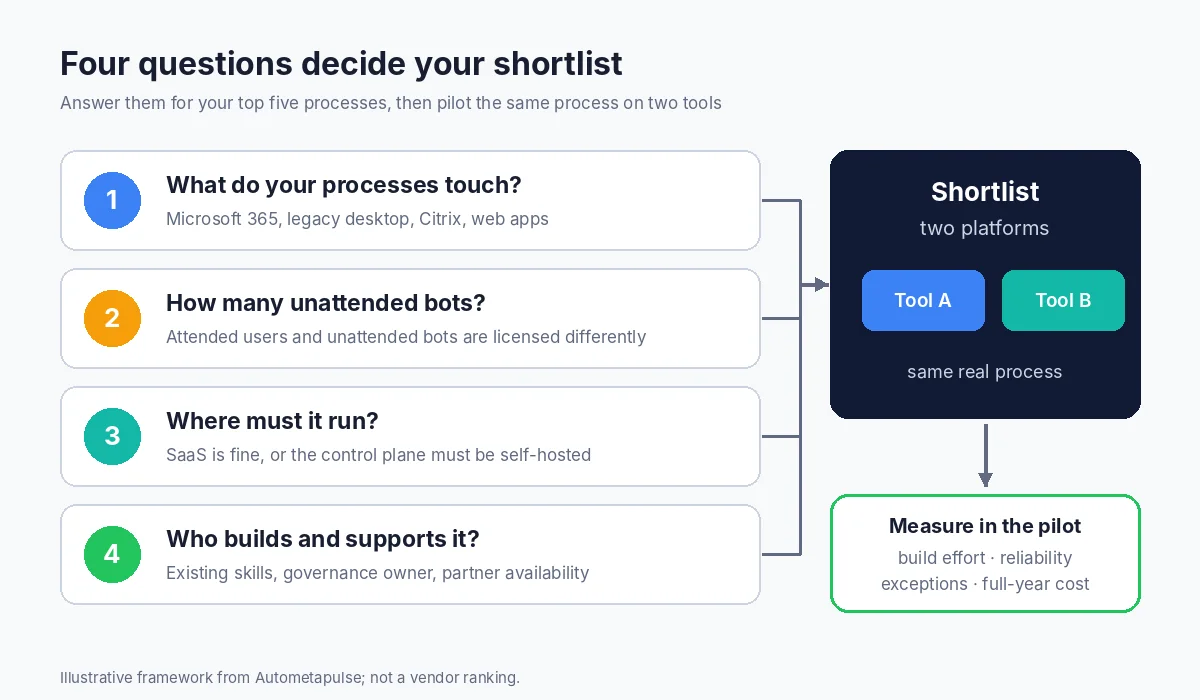
Instead of asking “which tool is best”, answer four questions for your processes.
1. What do your processes touch?
List the top five processes you want to automate and the systems each touches. If most are Microsoft 365, SharePoint, Outlook, Teams and Dataverse, Power Automate’s connectors do much of the work without UI automation. If many involve legacy desktop apps, Citrix or mainframe screens, test UI automation on all shortlisted tools against those exact apps.
2. How many unattended bots will you run?
Attended automation (a person clicks “run”) and unattended automation (a scheduled or queue-driven robot) are licensed differently on every platform. A team with many attended users and few unattended bots has a very different cost profile from a shared-service centre running bots around the clock.
3. Where must it run?
If the control plane must be self-hosted, your shortlist is UiPath (Automation Suite or standalone) and Automation Anywhere (On-Premises Control Room). If SaaS is fine, all three remain in play, and region and data-residency options decide the rest.
4. Who will build and support it?
Skills matter as much as features. A team already building Power Apps and Power BI will move faster in Power Automate. A dedicated RPA centre of excellence may prefer UiPath’s or Automation Anywhere’s developer tooling, queues and orchestration. Factor in hiring, training and partner availability in your region.
Run a two-tool pilot
After the four questions, shortlist two platforms and pilot the same real process on both for two to four weeks. Measure build effort, run reliability, exception handling and the full-year cost estimate.
Frequently asked questions
Which RPA tool is best for beginners?
For people already using Microsoft 365, Power Automate is usually the easiest start because cloud flows connect familiar apps. UiPath StudioX and Automation Anywhere’s Automation Workspace are also aimed at business users. Pick the one that matches the apps you use every day.
Is Power Automate a real RPA tool or just a workflow tool?
Both. Cloud flows are API-based workflows, and desktop flows built in Power Automate for desktop are RPA that automate desktop and web user interfaces, attended or unattended.
Do I need a separate licence for unattended bots?
On all three platforms, unattended automation is licensed differently from attended use. In Power Automate it needs the Process plan (or Hosted Process for Microsoft-hosted machines); UiPath and Automation Anywhere have their own unattended robot or Bot Runner licences.
Can I run these platforms on-premises?
UiPath (Automation Suite or standalone products) and Automation Anywhere (On-Premises Control Room) can be self-hosted. Power Automate orchestration runs in Microsoft’s cloud, while the robots can run on your own machines.
Do UiPath and Automation Anywhere support macOS?
Yes, per their documentation: UiPath supports robots on Windows, macOS and Linux, and Automation Anywhere documents a Bot Agent for macOS. Power Automate for desktop runs on Windows only.
Which platform has the best AI features?
All three now combine RPA with document extraction, generative AI and agents, and the features change quickly. Compare them on one of your real documents or tasks, and check how AI usage is billed (Copilot Credits, AI or Agent Units, or Automation Credits).
Can I use more than one RPA platform?
Yes, many organisations do, for example Power Automate for Microsoft 365 workflows and another platform for a central RPA team. The cost is duplicated governance, skills and support, so make it a deliberate choice.
Conclusion: pick the platform that fits your processes
There is no single winner in an RPA tools comparison. Power Automate fits organisations built on Microsoft 365, UiPath fits teams that want a broad platform with cloud or self-hosted options, and Automation Anywhere fits teams that want a web-based, cloud-native builder with a strong Control Room. Answer the four questions, shortlist two tools, and let a pilot on one real process decide. Explore our Power Automate, UiPath and Automation Anywhere guides, or let us help you run the assessment.